
Android 16 to Bolster Mobile network Security Against “stingray” Attacks
Table of Contents
- Android 16 to Bolster Mobile network Security Against “stingray” Attacks
- Android 16’s New Security Feature: Detecting “Stingray” Attacks
- Limited Availability: The Impact of Google’s Requirements Freeze
- “Mobile Network Security” Settings in Android 16
- Evergreen Insights: The Evolution of Mobile Network Security
- Frequently Asked Questions About Android 16 mobile Network Security
Android users will soon gain enhanced protection against mobile network surveillance with the arrival of Android 16. The latest iteration of Google’s mobile operating system introduces a critical security enhancement designed to detect and alert users to potentially dangerous “stingray” attacks, where fake mobile networks attempt to intercept communications. This new feature aims to provide a warning when a device connects to an unencrypted network or when the network requests sensitive device identifiers, offering a notable boost to user privacy and data security.
Android 16’s New Security Feature: Detecting “Stingray” Attacks
The core of this update lies in its ability to identify and notify users about suspicious network connections. These attacks often involve devices known as “stingrays,” which mimic legitimate cell towers to trick mobile phones into connecting to them. Onc connected, these fake networks can collect unique identifiers, such as the International Mobile Equipment Identity (IMEI), and even force devices onto older, more vulnerable communication protocols.
Did You Know? Stingray devices have been a topic of controversy, with concerns raised about their use by law enforcement and potential for misuse by malicious actors.
According to a 2023 report by the Electronic Frontier Foundation, the use of stingrays raises significant privacy concerns due to their ability to indiscriminately collect data from mobile devices within range.
Electronic Frontier Foundation
how Android is Combating Mobile Network threats
Google has been progressively adding features to counter these threats. Android 12 introduced the option to disable 2G connectivity at the modem level, while Android 14 extended this by supporting the disabling of connections using null ciphers, which represent unencrypted communication. Android 15 further enhanced security by notifying the OS when a network requests a device’s unique identifiers or attempts to enforce a new ciphering algorithm.
Pro Tip: Regularly check your Android device’s security settings to ensure that features like 2G network protection are enabled for optimal security.
These measures directly address the tactics employed by stingrays, which often involve downgrading devices to 2G or using null ciphers to facilitate easier interception of traffic. By blocking these connections and alerting users to suspicious requests, Android aims to provide a robust defense against mobile network surveillance.
Limited Availability: The Impact of Google’s Requirements Freeze
Despite these advancements,the immediate availability of the new security feature is limited. Due to Google’s Requirements Freeze (GRF) program, which allows Original Equipment Manufacturers (OEMs) to finalize hardware-related requirements at launch, existing devices are unlikely to receive updates that fully support the new notification feature.
This limitation stems from the fact that implementing these protections requires corresponding changes to a phone’s modem driver. Such as, the feature that notifies the OS about identifier requests necessitates a modem that supports version 3.0 of Android’s IRadio hardware abstraction layer (HAL).
Consequently, the full benefits of this security enhancement will likely be realized on upcoming devices launching with Android 16, such as the anticipated Pixel 10 series. These devices will be equipped with the necessary hardware and software configurations to support the advanced security features.
“Mobile Network Security” Settings in Android 16
With Android 16,Google is reintroducing the “mobile network security” settings page within the Safety center (Settings > Security & privacy). This page includes two key subsections:
-
Notifications:
-
A “Network notifications” toggle allows users to enable warnings when their device connects to an unencrypted network or when the network requests unique identifiers.This toggle is disabled by default.
-
-
Network generation:
-
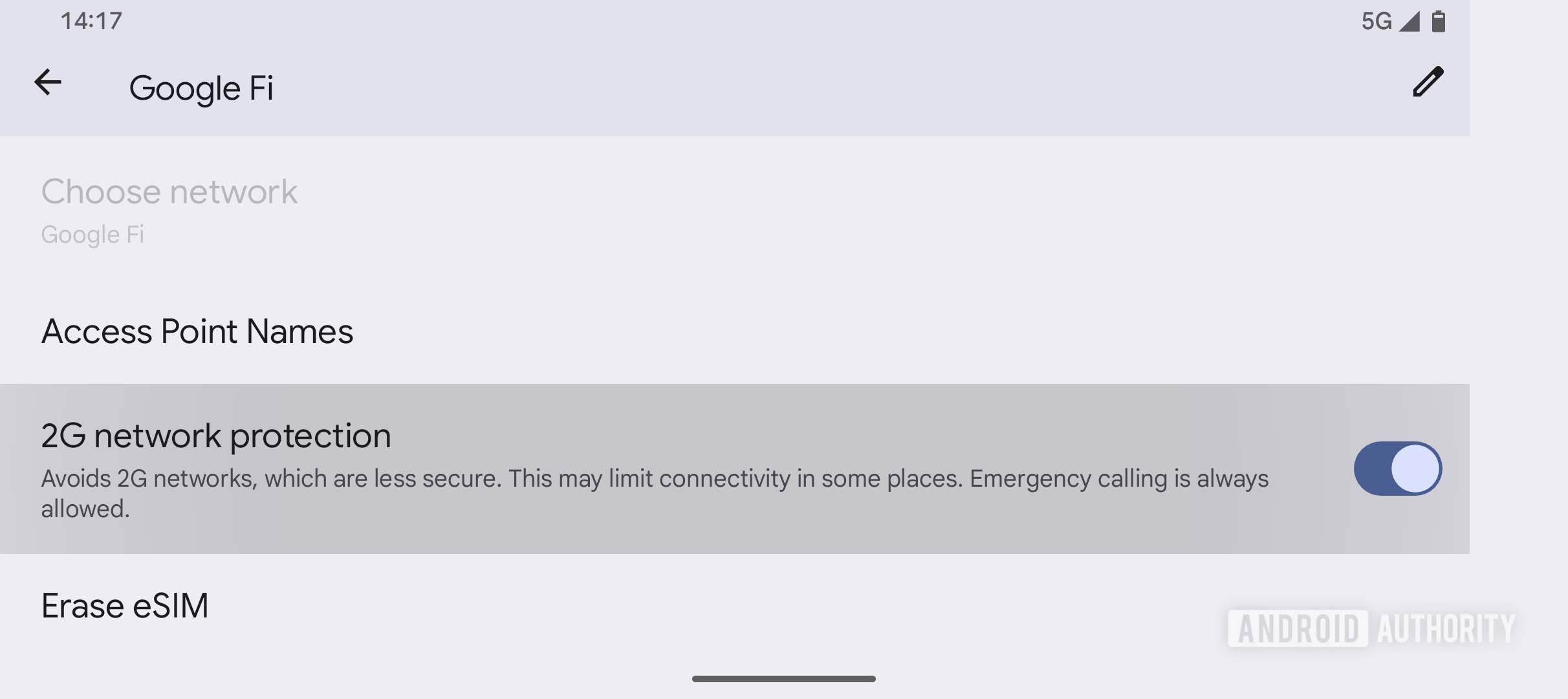
A “2G network protection” toggle enables users to disable 2G connectivity, preventing downgrades to less secure networks.
-
These settings provide users with greater control over their mobile network security,allowing them to customize their protection based on their individual needs and risk tolerance.
| Android Version | Security Feature | Description |
|---|---|---|
| Android 12 | 2G Connectivity Disabling | Introduced the option to disable 2G connectivity at the modem level. |
| Android 14 | Null Cipher Disabling | Supported the disabling of connections using null ciphers (unencrypted communication). |
| Android 15 | Identifier Request Notification | Added support for notifying the OS when a network requests a device’s unique identifiers. |
| Android 16 | “stingray” Attack Detection | Introduces a feature to warn users about connections to unencrypted networks or requests for unique identifiers. |
Evergreen Insights: The Evolution of Mobile Network Security
The evolution of mobile network security has been a continuous process, driven by the increasing sophistication of cyber threats and the growing reliance on mobile devices for sensitive communications. Early mobile networks were designed with limited security features, making them vulnerable to interception and eavesdropping.
Over time, advancements in encryption and authentication protocols have considerably improved the security of mobile communications. Though, vulnerabilities remain, notably in older network technologies like 2G, which are still widely used in many parts of the world.
The introduction of features like “stingray” detection in Android 16 represents a significant step forward in protecting users from sophisticated surveillance techniques.As mobile technology continues to evolve, ongoing efforts to enhance security and privacy will be essential to maintaining trust and confidence in mobile communications.
Frequently Asked Questions About Android 16 mobile Network Security
- What is the new mobile network security feature in android 16?
- Android 16 introduces a security feature that warns users when their phone connects to potentially insecure or fake mobile networks, also known as “stingrays.” This feature alerts users to unencrypted connections or when the network requests the phone’s unique identifiers.
- How does Android 16 protect against stingray attacks?
- Android 16 can notify users if the operating system detects that a network is requesting unique device identifiers or attempting to force a new ciphering algorithm. These features directly counter the tactics used by stingrays, which trick devices into downgrading to 2G or using null ciphers to make traffic easier to intercept.
- Will current Android devices receive the mobile network security update?
- Due to hardware-related requirements locked in at launch through Google’s Requirements Freeze (GRF) program, it is unlikely that current devices will be updated to fully support the new mobile network security notifications feature.This protection will likely be implemented on new devices launching with Android 16.
- What is a “stingray” device and how does it compromise mobile security?
- A “stingray” is a device used to mimic legitimate cell towers,tricking nearby mobile devices into connecting to it. This allows attackers to collect unique identifiers and potentially force devices onto older, more insecure communication protocols, intercepting unencrypted data.
- Where can I find the mobile network security settings in Android 16?
- in Android 16, the “mobile network security” settings page can be found in the Safety Center under Settings > Security & privacy.This page includes subsections for Notifications and network generation, allowing users to manage alerts and 2G network protection.
- What is the significance of disabling 2G connectivity for mobile security?
- Disabling 2G connectivity prevents devices from being forced onto older, less secure network protocols. Stingray devices frequently enough exploit 2G vulnerabilities to intercept unencrypted text messages and phone calls,making the ability to disable 2G a crucial security measure.
The information provided in this article is for general informational purposes only and does not constitute professional advice. Consult with a qualified expert for specific security recommendations.
What are your thoughts on Android 16’s new security features? Will this make you feel safer? Share your opinions in the comments below!
