
Samsung Phones Boast Hidden Wi-Fi Power
Unlock advanced network tools for optimized connectivity.
A concealed suite of Wi-Fi tools exists within Samsung’s One UI software, offering users surprising command over their wireless networks. This hidden menu, dubbed Connectivity Labs, provides in-depth diagnostic information and control for savvy users seeking to boost their daily Wi-Fi experience.
Accessing Connectivity Labs
Tapping into this concealed menu is simple, though not immediately apparent. From the Galaxy phone’s Settings app, navigate to Connections, then Wi-Fi. In the top-right corner, tap the three-dot menu and choose Intelligent Wi-Fi.
At the bottom of the screen, tap the words Intelligent Wi-Fi seven times. A pop-up will count down the taps, enabling the feature. Once activated, a Connectivity Labs option appears.
Analyze Your Network
Once inside Connectivity Labs, select Home Wi-Fi inspection to identify spots with a weak signal. The feature asks you to walk around your house, testing the connection and pinpointing weak spots, helping you decide if you should move your router.
Smart Network Switching
Several toggles influence how your phone interacts with Wi-Fi. For unlimited data users, enabling Switching to mobile data faster lets the phone abandon weak Wi-Fi for cellular data.
Another option is Auto reconnect to carrier Wi-Fi. Carriers often offer public Wi-Fi, and while phones connect automatically, you can now disable this feature.
Customize Wi-Fi List
The Customize Wi-Fi list settings allow a filter button to be added to the main Wi-Fi list, allowing quick sorting for secured networks or those using the Wi-Fi 6 standard.
Advanced Options
A Wi-Fi developer options menu exists at the bottom of the Connectivity Labs page. The Nearby Wi-Fi information page displays all networks, categorizing signal strength as Best, Good, Bad, or Worst.
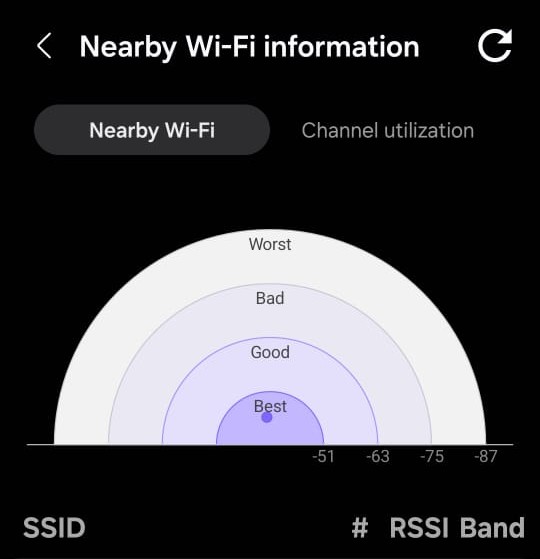
In public places with multiple networks, this tool helps users pick the strongest connection. According to Statista, the average global mobile download speed was 52.78 Mbps as of February 2024, highlighting the importance of optimized connectivity (Statista).
Though some options cater to advanced users, tools like the home Wi-Fi inspection and network filters may benefit a wide range of users.
