
Android Gemini Simplifies Quick Reminders
Setting quick reminders on Android devices just became more streamlined, thanks to a clever integration with Google’s Gemini. This new method offers a more intuitive way to capture fleeting thoughts and turn them into timely alerts.
Instant Reminders Via Screenshot
Inspired by a community idea, Intelligence Insider highlights a simple, effective process using core Google apps. This method leverages the Gemini Android Assistant, avoiding reliance on external applications.
The process involves capturing a screenshot of whatever you need to remember. Users can simultaneously press the power and volume down buttons to grab the image.
Setting Up Gemini
After the screenshot, a confirmation pop-up appears, offering a share icon. Selecting Gemini from the share list is the next step. While Gemini comes pre-installed on newer devices, older devices can get it through updates or manual download of the official app.
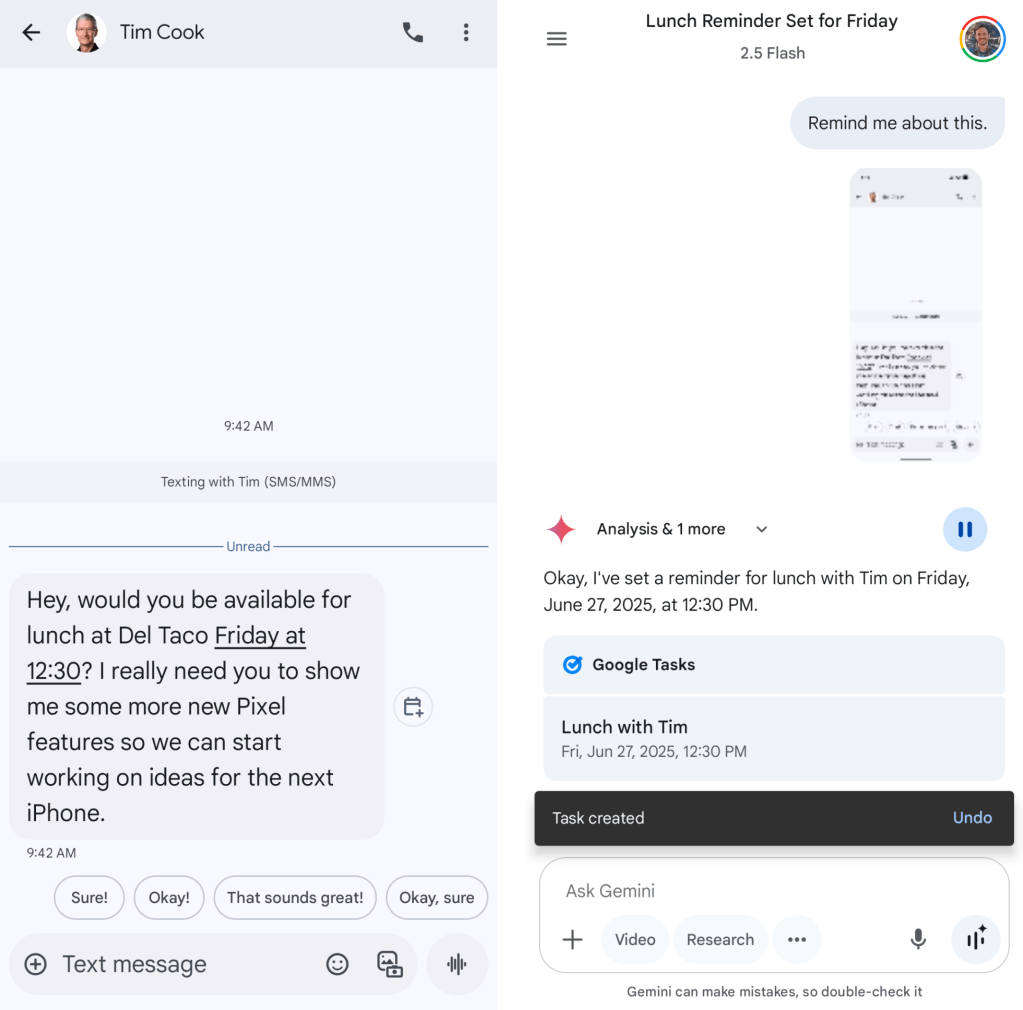
For easier access, you can pin Gemini to the top of Android’s share menu. Once Gemini opens, the screenshot will be in the input window, allowing you to type or use the microphone button to command “Remind this,”
specifying the date and time if necessary.
Versatile Application
This approach excels when the screen displays tasks or activity details. Gemini can automatically extract relevant information from the screenshot, including dates and times. According to Statista, the average smartphone user receives 46 notifications per day, highlighting the need for efficient reminder systems (Statista 2024).
A Practical Tool
Combining the right situation with the correct method shows how Gemini can be genuinely helpful on Android. This feature provides real assistance, unlike some overhyped functionalities.
