
Android 17 Leaks Reveal New Look for Screen Recording, Separated quick Settings & Notification Shade, and More
New leaks are surfacing about Android 17, codenamed “Cinnamon Bun,” showcasing a redesigned user interface. Hear’s a breakdown of the key changes:
Visual Comparison with iOS 26:
The article notes a visual contrast between Android 17 and the anticipated iOS 26.While iOS 26 is described as looking “wet,” Android 17 is aiming for a “frosted look.”
Screen Recording Redesign:
* Floating Pill: The screen recording feature is moving away from the current “chunky and clunky” UI with Quick Settings in the background, adopting a floating pill-shaped interface.
* options: Tapping “Entire screen” reveals options to record device audio, microphone audio, and show touches.
* Status Bar Timer: The status bar timer remains visible during recording.
* Pill Reappearance: Tapping the screen during recording brings back the floating pill.
* Editing & sharing: A preview screen appears after recording, allowing for editing and sharing.
Power Menu & Background Blur:
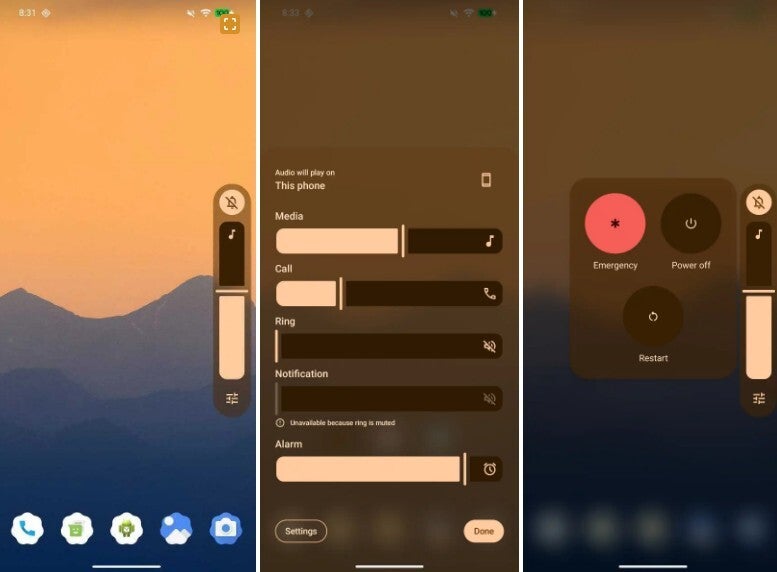
* Translucent Power Menu: The power menu will be translucent with a blurred background.
* Blurred Backgrounds: Backgrounds are generally getting a blur effect, as seen in the leaked images.(See image caption: “Blur backgrounds are coming to Android 17. | Image credit-@RKBDI”)
Quick Settings & Notification Shade Separation:
* Separation: Android 17 is expected to separate the Quick Settings panel from the Notification Shade.Currently, a single swipe down reveals both.
Source:
The leaks originate from X subscriber @RKBDI.
