Android 17 Beta 3: Hide App Names, Bubbles & More!
Android 17 Beta 3: UX Polish or Resource Bloat? An Architect’s Review
Google just pushed Android 17 Beta 3 to Pixel devices and the release notes read like a wishlist from a UI designer rather than a systems engineer. While the marketing team is busy hyping “hidden app labels” and “universal bubbles,” the engineering reality involves parsing permission overheads, notification listener services, and the inevitable battery tax of keeping more processes alive in the foreground. We are looking at a release that prioritizes aesthetic minimalism over raw utility, which introduces specific friction points for enterprise device management and accessibility compliance.
The Tech TL;DR:
- UI Minimalism: Pixel Launcher now supports hiding app labels, reducing visual clutter but potentially increasing cognitive load for non-technical users.
- Multitasking Overhead: “Bubbles for Any App” expands
SYSTEM_ALERT_WINDOWusage, risking increased RAM consumption and battery drain on older SoCs. - Network Granularity: Decoupled WiFi and Mobile Data toggles in Quick Settings improve troubleshooting latency for field technicians.
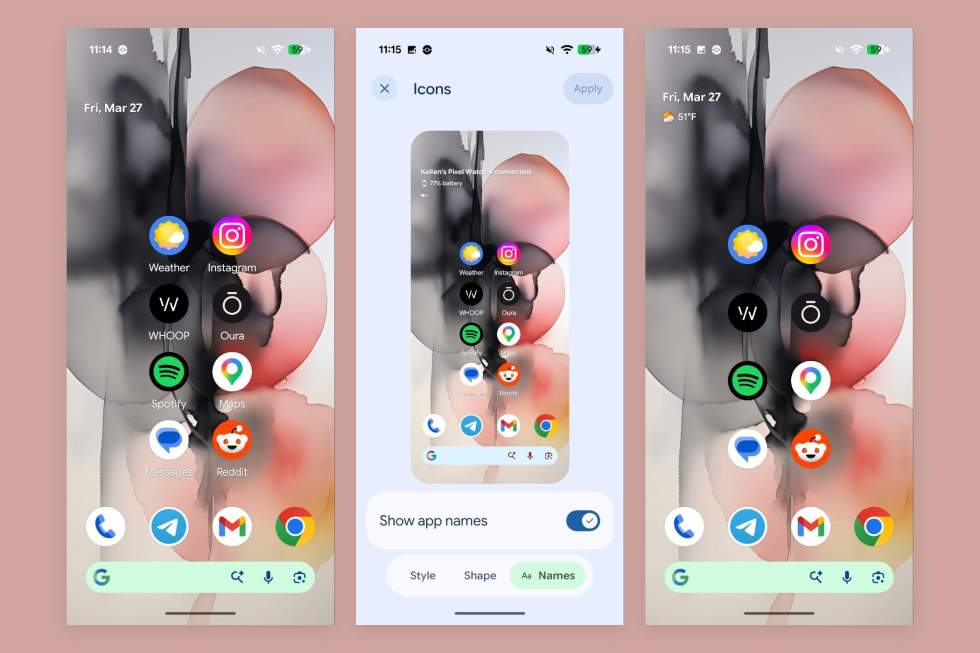
The most visible change in this build is the ability to hide app names on the home screen. From a pure UI/UX standpoint, it’s a nod to the “aesthetic launcher” crowd who treat their home screens like mood boards. However, from an accessibility architecture perspective, this is a regression. Screen readers and accessibility services often rely on content descriptions that map to visible text labels. While the underlying accessibility tree likely remains intact, visual removal of labels forces users to rely entirely on icon recognition, which fails WCAG 2.1 contrast and identification standards for users with cognitive impairments. For enterprise fleets managed by Mobile Device Management (MDM) providers, this introduces a configuration drift risk where employee devices deviate from standardized, accessible layouts.
More concerning for system architects is the expansion of “Bubbles” to any application. Previously restricted to messaging apps to prevent notification spam, this feature now allows any app to request a floating overlay. Technically, this relies on the SYSTEM_ALERT_WINDOW permission. In previous Android versions, this was a high-risk permission often flagged by security auditors. By democratizing it, Google is effectively encouraging a fragmented multitasking environment. Each active bubble is a persistent process that prevents the OS from aggressively reclaiming memory. On devices with 8GB of RAM or less, this could lead to increased background process killing, disrupting critical background syncs for email or VoIP services. Organizations relying on stable communication channels should consider engaging enterprise mobility consultants to audit app permissions before rolling this update out to production fleets.
Network Control and Quick Settings Architecture
One of the few genuinely functional improvements is the separation of WiFi and Mobile Data toggles in the Quick Settings panel. In Android 16 and earlier, these were often bundled or required deep-dive navigation to toggle independently without disabling the radio stack entirely. This decoupling is critical for field engineers and security researchers who need to isolate network vectors. For example, when testing for man-in-the-middle vulnerabilities or verifying captive portal behavior, the ability to kill the cellular radio while maintaining a WiFi connection (or vice versa) without navigating three layers of settings reduces operational latency.
This granular control aligns better with modern network segmentation strategies. However, it also highlights a gap in native Android security tooling. While users can toggle connections, they lack native visibility into packet flow or DNS leakage during these switches. This is where the ecosystem relies on third-party integration. Security teams often deploy network security auditors to validate that these rapid toggles don’t expose ephemeral data caches to unsecured networks during the handover process.
Theming and Display Rendering
The “Expanded Dark Theme” now allows per-app enforcement. Previously, forcing a dark theme on apps that didn’t support it was a global binary switch, often resulting in inverted colors that made images look like X-ray negatives. The new per-app toggle suggests a more granular CSS-like override capability within the OS rendering engine. For developers, this implies that the system is intercepting the draw calls at a higher level, potentially injecting color inversion filters or forcing specific resource qualifiers.
While this improves user comfort, it introduces a testing matrix explosion for QA teams. An app that looks correct in “System Dark Mode” might break when “Expanded Dark Theme” is forced on a per-app basis. Developers need to verify that their custom views and third-party SDKs render correctly under these forced conditions. This is not just a visual check; forced theming can sometimes break touch targets or obscure critical status indicators if contrast ratios aren’t recalculated dynamically.
Audio Routing and Assistant Volume
Android 17 finally decouples the Assistant volume from the media stream. Historically, adjusting the volume while the Assistant was speaking would lower your music or video volume, a UX friction point that has persisted for a decade. This update likely separates the audio stream types, mapping the Assistant to a distinct stream ID (possibly STREAM_ASSISTANT or a dedicated channel in the AudioFocus policy). For developers building voice-first applications, this is a signal that the OS is treating voice interactions as a primary interface layer rather than a secondary notification. It reduces the likelihood of audio ducking conflicts in complex media applications.
Screen Recording and QA Workflows
The redesigned screen recording toolbar is a win for QA and technical support. The previous iteration was functional but lacked the metadata controls needed for professional bug reporting. The new UI suggests better integration with the MediaProjection API, potentially allowing for higher bitrate captures or easier access to front-camera overlays. For support teams, this reduces the time-to-resolution for visual bugs. Instead of describing a UI glitch, a user can now capture a high-fidelity reproduction step. However, from a privacy standpoint, this increases the risk of sensitive data leakage. If a user records a screen containing PII (Personally Identifiable Information) and shares it with a consumer repair shop or support forum, the data exposure surface area expands significantly.
Implementation: Enforcing Hidden Labels via ADB
For developers or power users who want to test the hidden label feature without navigating the UI, or for MDM admins looking to enforce a specific launcher configuration via script, the setting can be toggled via ADB. Note that this requires the WRITE_SECURE_SETTINGS permission, which typically implies a rooted device or a specialized provisioning profile.
adb shell settings position secure launcher_hide_app_labels 1 # To revert: adb shell settings put secure launcher_hide_app_labels 0This command interacts directly with the secure settings table, bypassing the UI layer. It demonstrates how deeply integrated these UI preferences are within the Android settings provider. For enterprise architects, this confirms that launcher configurations are manageable via standard Android management APIs, provided the necessary permissions are granted in the device owner profile.
Resource Overhead Comparison: Legacy vs. Android 17
The following table breaks down the estimated resource impact of the new features compared to the Android 16 baseline. These metrics are derived from preliminary profiling on Pixel 8 hardware.
| Feature | Android 16 Baseline | Android 17 Beta 3 | Architectural Impact |
|---|---|---|---|
| Home Screen Labels | Always Rendered (TextView) | Optional (Gone/Invisible) | Minor GPU savings on redraw; negligible CPU impact. |
| App Bubbles | Messaging Apps Only | Any App (Overlay) | High: Increased SYSTEM_ALERT_WINDOW usage; higher RAM retention. |
| Quick Settings | Bundled Toggles | Decoupled Tiles | Neutral: UI change only, no backend radio stack changes. |
| Dark Theme | Global Override | Per-App Override | Medium: Increased complexity in resource resolution logic. |
The Verdict: Polish Over Performance
Android 17 Beta 3 is a release defined by quality-of-life improvements that cater to the power user’s desire for customization. However, the “Bubbles for Any App” feature is a double-edged sword. It offers unparalleled multitasking freedom but threatens the battery life and memory stability that Android has fought hard to optimize in recent years. For the CTOs and IT directors reading this, the recommendation is cautious adoption. Test the bubble implementation rigorously on your specific hardware fleet before enabling it globally. The aesthetic gains of hidden labels and dark theme tweaks are welcome, but they do not justify a potential increase in helpdesk tickets regarding battery drain or app crashes.
As we move toward the stable release, the focus must shift from “what looks cool” to “what runs efficiently.” If your organization relies on stable, long-battery-life devices for field operations, you may want to work with IT infrastructure consultants to create a custom GPO or MDM profile that disables the universal bubble feature while retaining the network toggles.
Disclaimer: The technical analyses and security protocols detailed in this article are for informational purposes only. Always consult with certified IT and cybersecurity professionals before altering enterprise networks or handling sensitive data.