
WhatsApp Adopts Apple’s “Liquid Glass” Design for iOS 26
SUNNYVALE, CA – October 9, 2025 – WhatsApp has begun deploying a notable visual update for its iOS app, integrating Apple’s new “Liquid Glass” design language with the release of iOS 26.The rollout,first reported by WABetaInfo,marks one of the most considerable interface changes for the messaging platform in years.
The redesign leverages the iOS 26 SDK to incorporate dynamic transparency, depth effects, and fluid motion animations, resulting in a more modern look and feel. The update was initially spotted in the WhatsApp beta version 25.24.10.70 and is now reaching a limited number of users.
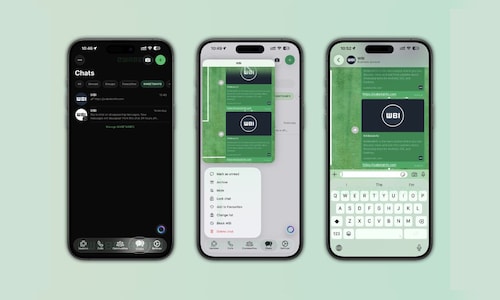
According to WABetaInfo, the most promptly noticeable change is to the tab bar, which now features a semi-translucent finish that subtly blurs the background, creating a “floating” effect similar to native iOS applications like Messages and Music. the tab icons also respond with smooth animations upon being tapped, and the active tab highlight dynamically adjusts to fit the icon’s shape.
The Liquid Glass treatment extends to the keyboard and buttons within the app. The new translucent keyboard adapts to the chat background and reflects content behind it, while buttons showcase soft reflections and subtle animations for a more responsive user experiance. Context menus now appear with a frosted-glass effect that reacts to light and color in real-time.
WABetaInfo reports that the goal of these updates is to deliver a consistent and unified visual experience throughout the app, supporting both light and dark themes with automatic adjustments to transparency and background effects.
While the rollout is underway, not all elements of WhatsApp have been updated. The chat bar and message bubbles currently retain the older design,with further updates anticipated to complete the visual overhaul.
Currently, the update is being distributed gradually to users via testflight and the App Store. Access isn’t guaranteed with the latest version, as WhatsApp is selectively enabling the new interface to test stability and collect user feedback before a wider release.
For users interested in learning more about managing the transparency effects introduced with iOS 26, see this report: https://www.cnbctv18.com/technology/apple-ios-26-liquid-glass-reduce-transparency-setting-how-to-apply-19676405.htm
