What Is a 2.5G Ethernet Port and Do You Need One?
As multi-gigabit fiber subscriptions scale up across urban and regional markets—delivering throughput reaching up to eight gigabits per second from providers like Google Fiber and Greenlight Networks—home and office networks face a major bottleneck at the router. A standard 1G Ethernet port can no longer handle the data volume flowing from modern internet service providers, making the 2.5G Ethernet port an essential hardware inclusion for local networks dealing with high-bandwidth tasks.
Operational Briefing: 2.5G Ethernet Ports
- The Core Function: A 2.5G Ethernet port (2.5GbE) supports wired connection speeds up to 2.5Gbps, operating at 2.5 times the bandwidth of traditional 1G ports.
- The Hardware Threshold: These ports require ISP plans exceeding 1Gbps or internal multi-gigabit hardware like a Network Attached Storage (NAS) device to provide a noticeable performance increase.
- Cabling Standards: Existing Cat 5e, Cat 6, or Cat 6a copper wiring supports 2.5G speeds over standard runs without requiring costly infrastructure overhauls.
Understanding Multi-Gigabit Speeds and the 802.3 Standard
Governed by the IEEE Standard part 802.3 revision established in 2016, 2.5G and 5G Ethernet technologies bridge the gap between standard 1G connections and enterprise-grade 10G infrastructure. While 10G demands strict structural considerations and expensive transceivers, 2.5GbE utilizes existing twisted-pair copper cabling. According to hardware specifications, these ports run effectively on standard Category 6 cables up to the traditional 328-foot (100-meter) limit, while field tests on Reddit demonstrate that Category 5e wiring can also sustain 2.5 Gbps speeds across shorter distances.
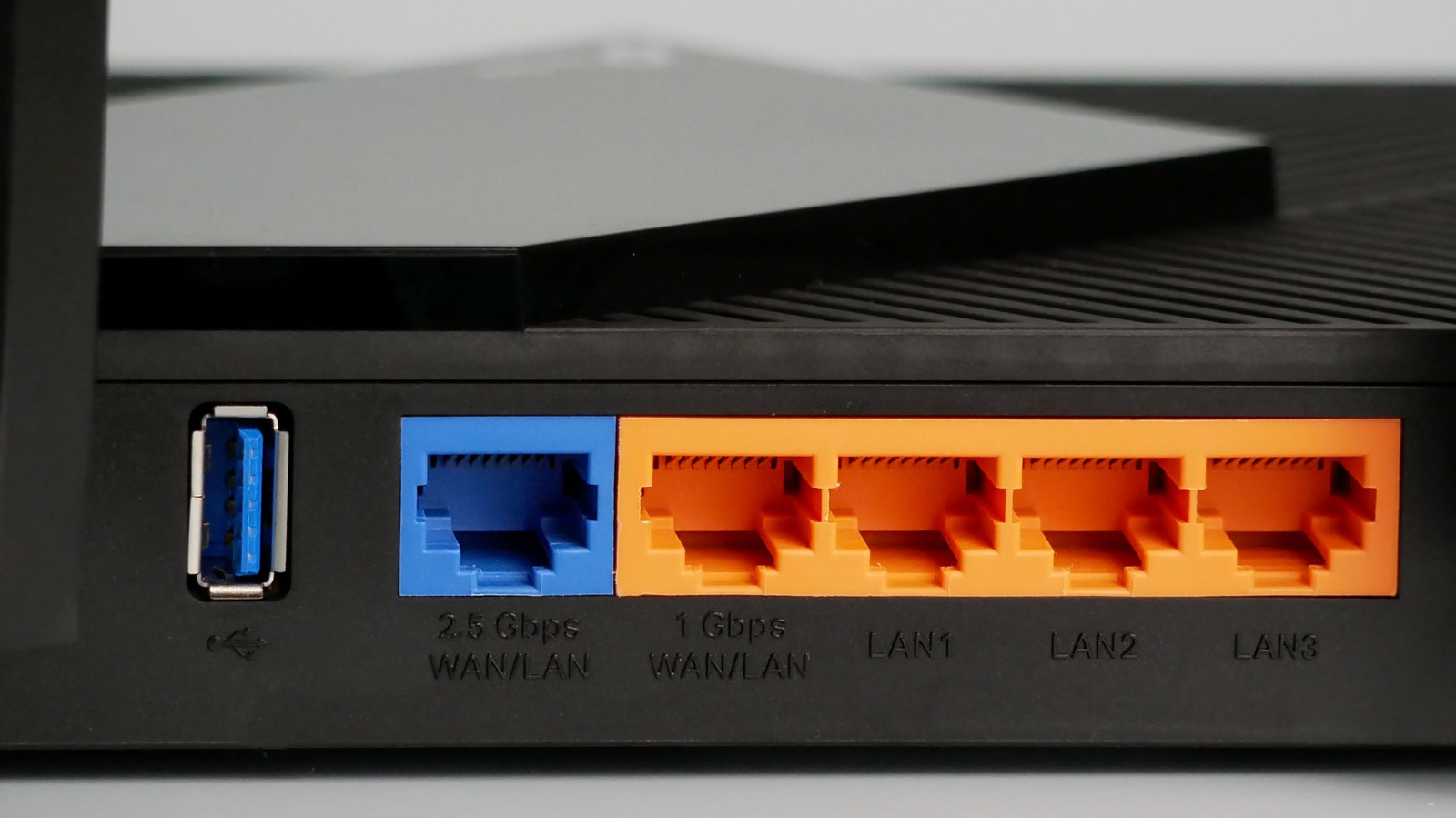
Checking equipment configuration requires a simple visual inspection or a review of the router’s manual. Manufacturers frequently designate multi-gigabit connections with explicit text labels next to the physical port, or group them alongside higher-tier 10G connections on advanced hardware like the TP-Link Archer BE900. When integrating these devices, copper Ethernet hardware relies on automatic negotiation to establish a mutually supported link configuration. A computer equipped with a legacy 1Gbps adapter will not magically scale to 2.5Gbps speeds simply by connecting to a multi-gigabit router port.

Evaluating Real-World Workloads for Multi-Gigabit Routing
Upgrading network infrastructure depends entirely on active workloads and data consumption patterns. Standard online activities like 4K or 8K video streaming—which typically peak around 120 megabits per second—along with cloud-based gaming, do not saturate a standard 1Gbps pipeline. Instead, latency remains the primary performance factor for those applications rather than raw throughput.
Conversely, workflows involving local file transfers, continuous cloud backups, or heavy interactions with a Network Attached Storage (NAS) device directly benefit from multi-gigabit switching. Moving terabytes of data across local hardware or managing server backups highlights the efficiency of a 2.5G connection. When a router features only a single high-speed port but requires multiple wired connections, system administrators and tech-focused consumers often deploy a multi-gigabit network switch to prevent the switch itself from becoming a system bottleneck.

# Check active network interface link speed on Linux systems
ip -s link show eth0

# Verify active connection speed via ethtool
ethtool eth0 | grep "Speed:"
Frequently Asked Questions About Multi-Gigabit Ports
Do I need to buy new Ethernet cables to use a 2.5G port?
No. Most existing Cat 5e, Cat 6, or Cat 6a cables support 2.5Gbps transmission rates over standard residential or office distances without requiring an upgrade.
Will a 2.5G port speed up my standard internet connection under 1Gbps?
No. If your internet service provider plan is capped below 1Gbps, a 2.5G port will not increase internet speeds, though it can still accelerate local data transfers between devices like a desktop PC and a local NAS.