
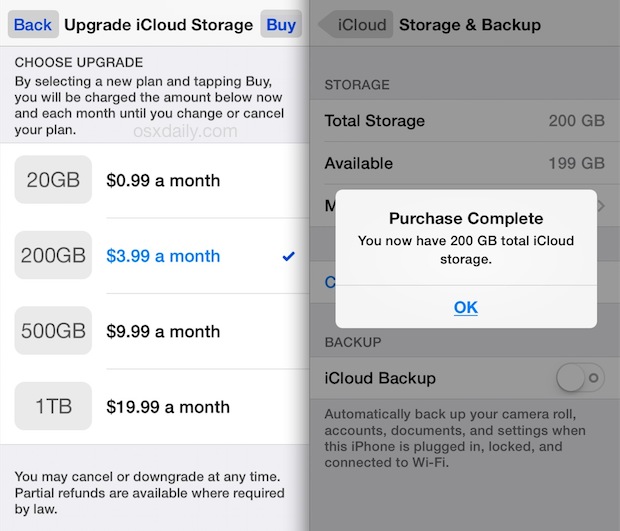
Upgrading iCloud Storage: Moving From 200 GB to 2 TB for Photos and Videos
The tension between local NAND flash constraints and expansive cloud object storage has reached a breaking point for the modern power user. When a user pairs a 128GB device with a 2TB or 12TB iCloud+ subscription, they aren’t just buying space; they are outsourcing their device’s primary memory management to Apple’s remote servers, creating a precarious dependency on bandwidth and latency.
The Tech TL;DR:
- Tier Escalation: iCloud+ has scaled beyond consumer needs, now offering 6TB and 12TB tiers for users with massive media libraries.
- Hardware Friction: A 128GB local storage ceiling forces heavy reliance on “Optimize Storage” logic, turning the device into a thin client for the cloud.
- Pricing Architecture: US pricing scales from $0.99 (50GB) up to $64.99 (12TB) per month, shifting the cost of data retention from hardware CapEx to monthly OpEx.
The architectural problem here is a classic mismatch of capacities. A user attempting to fill a 2TB cloud bucket using a 128GB hardware endpoint is essentially operating a high-throughput data pipeline through a narrow local aperture. According to official Apple Support documentation, iCloud+ is designed to keep information safe and automatically backed up, but the reality for the complete-user is a constant dance of cache eviction and remote fetching.
For enterprise users or creative professionals, this bottleneck often necessitates the intervention of [Managed Service Providers] to design hybrid storage workflows that don’t rely solely on a single consumer-grade cloud sync. When local storage hits 99% capacity, the OS begins aggressively purging local assets to make room for new writes, which can introduce significant latency during high-resolution media playback.
Deconstructing the iCloud+ Tier Architecture
Apple has pivoted iCloud from a simple backup utility into a multi-tiered SaaS product. The current pricing and feature matrix reflects a strategy to capture both the casual user and the “prosumer” who treats their iPhone as a primary production camera. The shift from the 200GB tier to the 2TB, 6TB, or 12TB tiers isn’t just about volume; it’s about the underlying infrastructure supporting HomeKit Secure Video and privacy-centric routing.
| Plan Tier | US Monthly Price | Key Technical Features | HomeKit Video Support |
|---|---|---|---|
| 50 GB | $0.99 | Private Relay, Hide My Email | One Camera |
| 200 GB | $2.99 | Private Relay, Hide My Email | Up to Five Cameras |
| 2 TB | $10.99 | Private Relay, Custom Email Domain | Unlimited Cameras |
| 6 TB | $32.99 | Private Relay, Custom Email Domain | Unlimited Cameras |
| 12 TB | $64.99 | Private Relay, Custom Email Domain | Unlimited Cameras |
From a systems perspective, the “Custom Email Domain” and “iCloud Private Relay” features are the real value-adds for the privacy-conscious developer. Private Relay acts as a dual-hop proxy, masking the user’s IP address to prevent third-party tracking, though as Apple notes, this can occasionally interfere with website sign-ins that require IP verification.
The “Optimize Storage” Bottleneck: Local NAND vs. Remote Object Store
The core issue for the user with a 128GB phone and a 2TB plan is the “Optimize Storage” mechanism. This is not a true backup; This proves a synchronization engine. The device maintains low-resolution thumbnails locally and fetches the full-resolution binary large objects (BLOBs) from Apple’s servers only when requested. This creates a dependency on the network stack; if the API response is delayed or the connection is throttled, the user experiences “loading” states for their own data.
When the local 128GB NAND is fully saturated, the OS must execute a continuous cycle of cache invalidation. This puts additional wear on the flash storage and increases the number of read/write cycles. For users experiencing systemic slowdowns or storage errors, consulting [Consumer Device Repair Specialists] is often the only way to diagnose if the NAND is failing under the pressure of constant cache swapping.
To analyze local storage pressure on a macOS environment linked to the same iCloud account, developers can use the following CLI command to monitor disk utilization and mount points:
# Check current disk usage and identify the iCloud drive mount point df -h | grep -E "Disk|CloudStorage" # Monitor real-time file system changes in the iCloud directory sudo fs_usage -w -f filesys iCloudiCloud+ vs. Enterprise Cold Storage
While iCloud+ is seamless for the consumer, it lacks the granular controls found in enterprise-grade object storage. In a professional production environment, a CTO would typically implement a tiered storage strategy: Hot storage (NVMe) for active projects, Warm storage (NAS/S3) for recent archives, and Cold storage (Glacier) for long-term retention. ICloud+ collapses these into a single “sync” bucket, which is convenient but lacks the SOC 2 compliance and versioning controls required for corporate data governance.
The deployment of the 12TB plan suggests that Apple is targeting users who are effectively using their mobile devices as primary servers for their digital lives. But, without a corresponding increase in base local storage, the hardware remains the primary bottleneck. The transition from 200GB to 2TB is a common inflection point where users realize that “cloud storage” is not a replacement for local capacity, but a supplement to it.
As we move toward more aggressive NPU integration and on-device AI, the necessitate for local high-speed data access will only increase. The current reliance on cloud-fetching for basic assets is a stopgap. The future of the mobile stack must involve either a massive leap in NAND density or a fundamental shift in how the OS handles remote data virtualization to eliminate the perceived latency of the “Optimize Storage” workflow.
Disclaimer: The technical analyses and security protocols detailed in this article are for informational purposes only. Always consult with certified IT and cybersecurity professionals before altering enterprise networks or handling sensitive data.