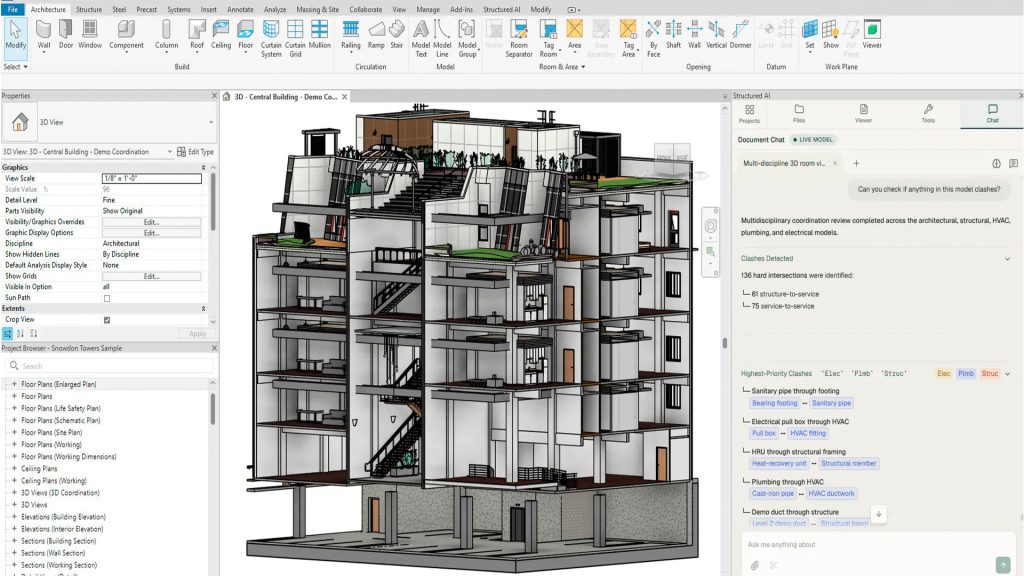
Structured AI Links BIM Models and Drawing Sets, AEC Magazine Reports
Structured AI released a quality assurance platform that links Building Information Modeling models directly with PDF drawing sets, specifications, codes, client manuals, and schedules, AEC Magazine reported.
The Tech TL;DR:
- Engineers can load IFC or native Revit files alongside drawing packages into a single review window.
- AI agents check drawings against specifications and codes, tracing sheet issues back to specific elements in the model.
- The platform integrates directly with Autodesk Construction Cloud and Bluebeam Studio to return native issues.
Structured AI Combines BIM Geometry with PDF Drawings
Design teams have traditionally checked models in one software tool and drawings in another, reviewing specifications and project manuals by hand in between. Structured AI combines these disparate data streams into a unified review environment. The platform loads BIM geometry via IFC or native Revit files alongside PDF drawing sets, codes, project manuals, and schedules. AI agents then run cross-checks between the documents. According to the company, any discrepancy discovered on a drawing sheet is traceable directly to the affected element inside the BIM model.
# Example conceptual validation check execution
def validate_drawing_element(sheet_id, model_element_id, rule_set):
    discrepancies = AI_Agent.cross_check(sheet_id, model_element_id, rule_set)
    if discrepancies:
        return issue_tracker.log_native_issue(sheet_id, model_element_id, discrepancies)
    return True
Automated Checks Identify Issues Across Architectural and Structural Work
The system utilizes a built-in library comprising more than 900 automated checks spanning architectural, structural, MEP, fire protection, and civil work, tailored to individual firm standards. Every finding is cited to the precise location on the drawing sheet or model view. All identified issues reside in a single consolidated list regardless of where they were originally raised. Inside Revit, the same findings open in a dedicated side pane where selecting an issue directs the engineer straight to the component in question. The add-in also executes live model checks and proposes fixes, which remain pending until an engineer reviews and approves them.
Platform Syncs with Autodesk Construction Cloud and Bluebeam Studio
Drawing sets sync directly from Autodesk Construction Cloud, and resolved findings return to the environment as native issues. The platform additionally connects with Bluebeam Studio. “A problem on a drawing is usually a problem in the model as well, and engineers have had to connect the two by hand,” said Raymond Zhao, co-founder and CEO of Structured AI. “We check both in one place, so a finding opens wherever the engineer is working, and the fix goes back into the model once they approve it.”
