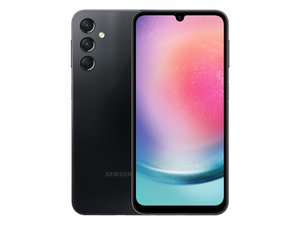
Samsung Galaxy A24 Cracked Screen and Display Lines: Fix and Repair Guide
The Samsung Galaxy A24 is a textbook example of the “budget-tier” compromise: a decent MediaTek Helio G80 SoC paired with a display assembly that lacks the structural rigidity of the S-series. When these devices hit the pavement, we aren’t just seeing glass fractures; we’re seeing the catastrophic failure of the OLED substrate, manifesting as those dreaded vertical lines.
The Tech TL;DR:
- Hardware Failure: Vertical lines indicate a damaged display driver IC (DDIC) or fractured organic layers, not just a cracked top-glass layer.
- Repair Reality: Component-level repair of the OLED panel is impossible; a full screen assembly replacement is the only viable path.
- Risk Factor: Cracked screens compromise the device’s IP rating (if any) and expose the internal PCB to moisture, risking a total board short.
For the average user, a cracked screen is a cosmetic nuisance. For a developer or a CTO managing a fleet of corporate-issued mid-range handsets, it’s a hardware vulnerability. The A24’s architecture utilizes a 90Hz Super AMOLED panel. When the glass cracks and lines appear, you are witnessing a breach in the vacuum-sealed environment of the OLED. Oxygen and moisture penetrate the organic layers, leading to rapid oxidation. This isn’t a software glitch that a factory reset can fix; This proves a physical layer failure that renders the digitizer and display output unreliable.
From an enterprise perspective, this highlights the fragility of the “value” segment in the hardware lifecycle. While the device is cost-effective, the Total Cost of Ownership (TCO) spikes when the Mean Time Between Failures (MTBF) is shortened by poor chassis rigidity. Organizations deploying these devices for field work often find themselves needing professional hardware repair services to maintain uptime for their mobile workforce.
The Hardware Breakdown: Why the A24 Fails
To understand why a simple drop leads to “lines” on the screen, we have to look at the display stack. The Galaxy A24 uses a flexible OLED substrate. Unlike LCDs, which have a separate backlight, OLEDs are self-emissive. The vertical lines are typically caused by a “column driver” failure. When the impact occurs, the microscopic gold bonds connecting the flexible printed circuit (FPC) to the glass substrate are severed.
According to the iFixit repairability database, the A24 is relatively accessible, but the screen is a fused unit. You cannot replace the glass alone without risking the destruction of the OLED panel. This is a strategic design choice by OEMs to push full-module replacements over granular repairs.
| Component | Specification | Failure Point | Impact |
|---|---|---|---|
| Display Panel | 6.5″ Super AMOLED | Substrate Fracture | Vertical Lines/Dead Pixels |
| Refresh Rate | 90Hz | Timing Controller | Screen Flickering |
| Chassis | Plastic Polycarbonate | Torsional Flex | Internal Component Stress |
| SoC | Helio G80 | N/A | Minimal (Unless board flexes) |
Looking at the benchmarks, the A24 is designed for efficiency, not durability. While its ARM-based architecture handles basic containerized apps and lightweight API calls well, the physical housing doesn’t provide the same shock absorption as the Gorilla Glass Victus+ found in the S23 or S24 lines. This creates a bottleneck in device longevity for high-intensity environments.
“The trend toward thinner OLED stacks in budget devices has created a fragility gap. We’re seeing a surge in ‘line-of-death’ failures where the physical impact doesn’t break the glass, but it shears the ribbon cable connections internally.” — Marcus Thorne, Senior Hardware Analyst at MobileTech Insights.
The Implementation Mandate: Diagnostic Triage
Before committing to a costly hardware replacement, developers and power users should determine if the issue is purely physical or if the impact has triggered a kernel-level display driver crash. While unlikely in the case of visible cracks, running a diagnostic check via ADB (Android Debug Bridge) can rule out software-side artifacts.
To check for system-level display errors or screen-dump logs, use the following CLI sequence in your terminal:
# Connect device via USB and check for system stability adb shell dumpsys surfaceflinger | grep -i "abnormal" # Check for kernel panics related to the display driver adb shell dmesg | grep -i "display" # Force a screen refresh to check for ghosting/artifacting adb shell cmd power set-mode 0 && adb shell cmd power set-mode 1If the surfaceflinger logs demonstrate no anomalies but the lines persist, the failure is confirmed at the hardware layer. At this point, the device is a liability. A cracked screen is an entry point for contaminants that can lead to short circuits on the motherboard, potentially compromising the device’s end-to-end encryption keys if the hardware security module (HSM) is affected by a power surge.
Risk Mitigation and Enterprise Recovery
For companies using the A24 as a budget endpoint, the “cracked screen” problem is a symptom of a larger procurement failure. Relying on consumer-grade hardware for industrial use leads to unplanned downtime. This is where the intersection of hardware stability and cybersecurity becomes critical. A damaged device is often a compromised device; a broken screen can lead to “ghost touches” that may inadvertently authorize transactions or bypass lock screens.

To mitigate this, enterprises are shifting toward ruggedized deployments or implementing strict MDM (Mobile Device Management) policies. If a device is compromised physically, it should be immediately quarantined. IT departments are increasingly utilizing cybersecurity auditors to ensure that hardware failures don’t lead to data leaks via physical port exposure.
If you are an individual user, the path is simple: avoid “cheap” third-party screens from unverified vendors. These often lack the proper SOC 2 compliance in their manufacturing and can introduce latent latency issues or lower brightness benchmarks. Instead, seek out certified electronics repair shops that provide genuine Samsung OLED replacements to ensure the 90Hz refresh rate and color calibration remain intact.
The trajectory of mobile hardware is moving toward foldable and flexible substrates, which will only exacerbate these failure modes. As we move toward more complex NPU-integrated handsets, the physical vulnerability of the display becomes the weakest link in the tech stack. The move from a “disposable” hardware mindset to a “circular” repair economy is not just an environmental necessity—it’s a technical requirement for stability.
Disclaimer: The technical analyses and security protocols detailed in this article are for informational purposes only. Always consult with certified IT and cybersecurity professionals before altering enterprise networks or handling sensitive data.