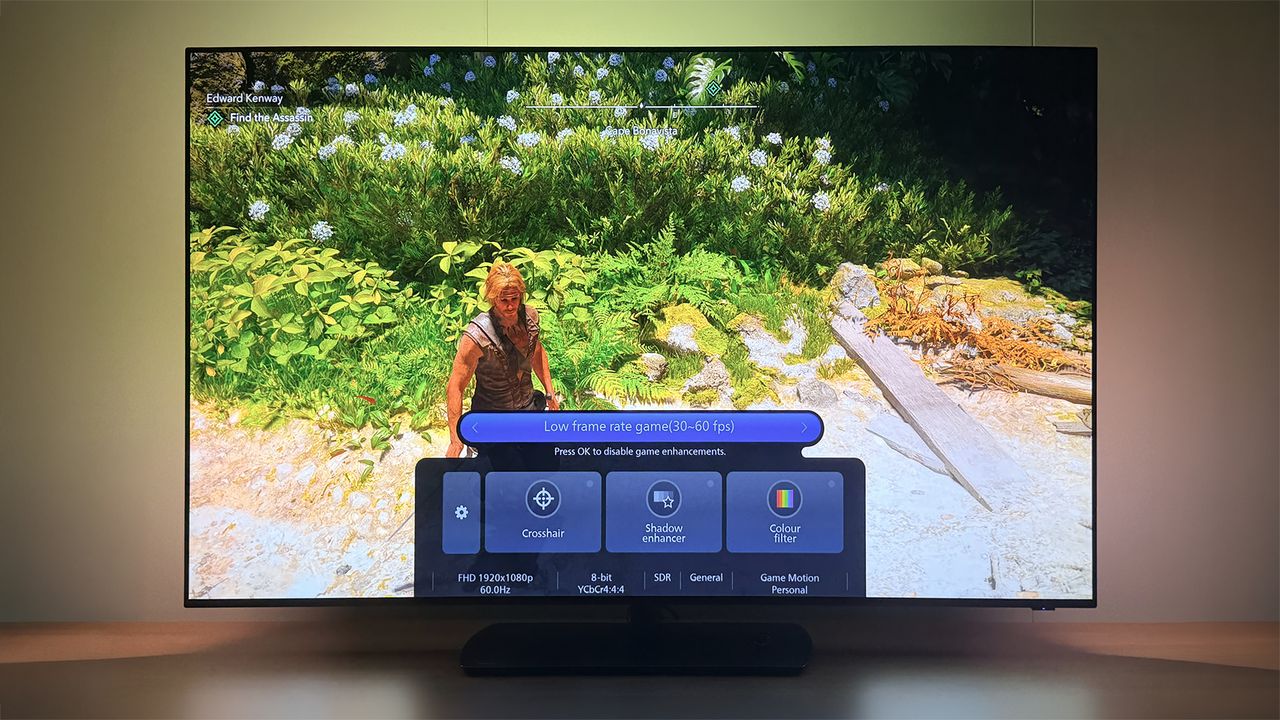
Philips OLED+951 Features Dedicated 30fps Mode for GTA 6 Gaming
Philips OLED+951 Brings Dedicated 30fps Game Mode for GTA 6
According to TP Vision, the upcoming Philips OLED+951 flagship television will feature a dedicated 30fps game mode designed to eliminate visible stutter in lower frame rate titles, arriving as anticipation builds around Rockstar Games’ upcoming launch of Grand Theft Auto VI. While modern console hardware typically pushes for high refresh rates, historical precedent and current industry reporting suggest that Grand Theft Auto VI will run at a locked 30 frames per second on PlayStation 5 and Xbox Series X/S hardware configurations.
The Tech TL;DR:
- Core Feature: The Philips OLED+951 introduces a dedicated 30fps game mode powered by the proprietary P5 AI Picture Engine.
- Latency Management: Unlike traditional motion interpolation systems that introduce up to 200 milliseconds of lag, this specialized gaming mode cuts latency down to 10 milliseconds.
- Ecosystem Integration: Developed in part through technical collaboration with Ubisoft for Assassin’s Creed Black Flag Resynced, the TV automatically detects launched games and applies custom preloaded profiles.
Hardware Processing and Latency Benchmarks
Running console software at 30 frames per second historically presents severe display challenges, including judder, camera stutter, and elevated input latency when standard motion smoothing algorithms are applied. Dieter Verlinde, team lead for picture quality innovation at TP Vision—which operates the Philips TV brand in the UK and Europe—explained during a demonstration at IFA 2026 that standard motion systems are unusable for interactive inputs due to processing delays. As Verlinde stated to technology publication T3, standard natural motion features add up to 200 milliseconds of latency, which destroys input responsiveness. To resolve this architectural bottleneck, TP Vision adapted its proprietary P5 AI Picture Engine to run a low frame game mode specifically optimized to drop latency down to 10 milliseconds.
For higher refresh rate titles, this specific processing overhead is bypassed. The Philips OLED+951 utilizes a native 165Hz Meta OLED panel, allowing games running at 60fps or higher to bypass the low-frame AI compensation entirely.
Software Architecture and Ubisoft Partnership Origins
Although the timing aligns with Rockstar’s upcoming open-world release, the underlying picture mode software was partly born through a joint development initiative with Ubisoft. TP Vision collaborated closely with the French software publisher, focusing specifically on optimizing display performance for Assassin’s Creed Black Flag Resynced. This partnership yielded a dedicated picture mode for the title that ships preloaded on the hardware, pairing specific color and contrast metrics with Philips’ proprietary Ambilight system.

Under the hood, the television’s software architecture includes automated profile switching. Developers and users can manually populate custom display profiles or rely on a reference mode designed for optimal out-of-the-box accuracy. When a game initializes, the TV’s AI-powered software stack identifies the application executable or signal signature and automatically loads the corresponding configuration without manual user intervention.
Implementation Code: Automated Profile Detection Logic
import asyncio
import json

class DisplayController:
    def __init__(self, panel_refresh_rate: int):
        self.refresh_rate = panel_refresh_rate
        self.active_profile = "default_reference"

    async def detect_incoming_signal(self, telemetry_payload: str):
        data = json.loads(telemetry_payload)
        game_id = data.get("game_id")
        target_fps = data.get("fps", 60)

        if target_fps <= 30:
            await self.apply_p5_ai_low_frame_mode(game_id)
        else:
            await self.reset_to_high_refresh_mode()

    async def apply_p5_ai_low_frame_mode(self, game_id: str):
        self.active_profile = f"optimized_{game_id}_30fps"
        # Latency target: 10ms processing threshold
        print(f"Profile Loaded: {self.active_profile} | Latency: 10ms | Stutter Mitigation: Active")

    async def reset_to_high_refresh_mode(self):
        self.active_profile = "native_165hz_bypassed"
        print(f"Profile Loaded: {self.active_profile} | P5 AI Frame Interpolation: Disabled")

# Execution simulation for an incoming 30fps console title
async def main():
    tv = DisplayController(panel_refresh_rate=165)
    sample_telemetry = '{"game_id": "gta_vi", "fps": 30, "resolution": "4k"}'
    await tv.detect_incoming_signal(sample_telemetry)

asyncio.run(main())
System Integration and Future Deployment Outlook
*Disclaimer: The technical analyses and security protocols detailed in this article are for informational purposes only. Always consult with certified IT and cybersecurity professionals before altering enterprise networks or handling sensitive data.*