Clicks Communicator Keyboard Phone Gets RAM, Battery, and Android 17 Boost
Clicks Communicator: The $499 BlackBerry-Style Android Phone
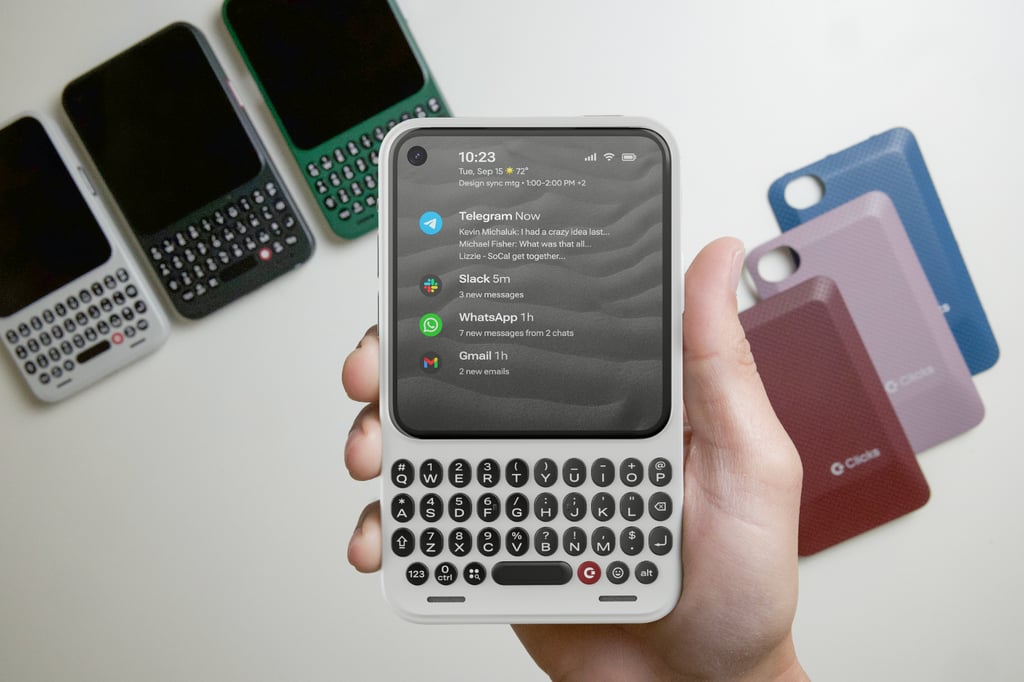
The Clicks Communicator, a $499 Android device debuting ahead of its wider market rollout, merges nostalgic physical keyboard design with modern hardware choices like 12GB of RAM, a 4,000 mAh silicon-carbon battery, and Android 17 compatibility. Unveiled by Clicks Technology—a company that previously shipped over 100,000 external slide-out keyboards to customers across more than 100 countries, according to CEO Adrian Li—the device is purpose-built for power users who handle heavy messaging workloads.
- Price and Tier: Priced at $499, with early-bird options starting at $399 for customers placing a deposit before February 27.
- Core Hardware: Features a tactile physical keyboard with touch-sensitive scrolling, a 50-megapixel main camera with optical image stabilization (OIS), a 24-megapixel front camera, and expandable microSD storage up to 2TB.
- Software & Productivity: Runs Android via Niagara Launcher to streamline access to essential communication apps like Gmail, Telegram, WhatsApp, and Slack while intentionally omitting addictive social media apps and games.
Architectural Specifications and Hardware Design
Moving past the initial retro aesthetic, the Clicks Communicator packs a utilitarian spec sheet tailored for mobile professionals. According to coverage from TechRepublic and the company’s announcement, the hardware includes a 4,000 mAh silicon-carbon battery, global 5G, 4G LTE, and 3G/2G support, Wi-Fi 6, Bluetooth 5.4, and NFC with Google Pay. Measuring 131.5 mm tall and weighing 170 grams, the unlocked device ships in three color variants: Smoke, Clover, and Onyx, complete with interchangeable back covers.
For input and navigation, the tactile keyboard is touch-sensitive, enabling users to scroll through web pages, email threads, and messaging lists without obscuring the display. Hardware purists will note the inclusion of legacy ports and physical controls that modern flagship smartphones abandoned years ago. The device features a 3.5mm headphone jack, a physical SIM card tray alongside eSIM support, and a tactile switch for toggling airplane mode.
Granular Notification Control via the Signal Light
A defining feature of the Communicator is its physical notification interface, known as the Signal Light. Located on the side of the device, this programmable light-up button can be customized with distinct color profiles and blink patterns to signal messages from specific contacts, VIP groups, or productivity applications. For instance, high-priority messages can trigger a purple pulse, while standard work chat tools display an amber fade. This hardware-level triage mechanism aims to reduce screen-checking fatigue by letting users categorize incoming alerts without unlocking the display.

Adjacent to the Signal Light, the Prompt Key allows users to immediately dictate messages or record voice notes directly from an active text field. While Clicks Technology has teased potential future integrations for AI-driven transcription services and voice agents, the core utility currently focuses on deterministic communication workflows.
Deployment and Integration Benchmarks
For software integration, the device avoids bloated manufacturer user interfaces by partnering with Niagara Launcher. This architectural choice limits distractions and prioritizes low-latency execution for productivity tools.

# Pull device logs and verify ADB connection status for target Android build
adb devices -l
adb logcat -s ClicksNotificationService:V
The device ships with a five-year commitment to security updates, running Android out of the box with expandable local storage that mitigates reliance on cloud-only data silos.
Editorial Kicker
The Clicks Communicator proves that market demand for tactile, single-purpose productivity hardware has not vanished in an era of uniform glass slabs. By combining enterprise-grade local storage limits, physical connectivity ports, and a dedicated notification architecture, the device carves out a durable niche for professionals who prioritize operational speed over multimedia consumption.
*Disclaimer: The technical analyses and security protocols detailed in this article are for informational purposes only. Always consult with certified IT and cybersecurity professionals before altering enterprise networks or handling sensitive data.*