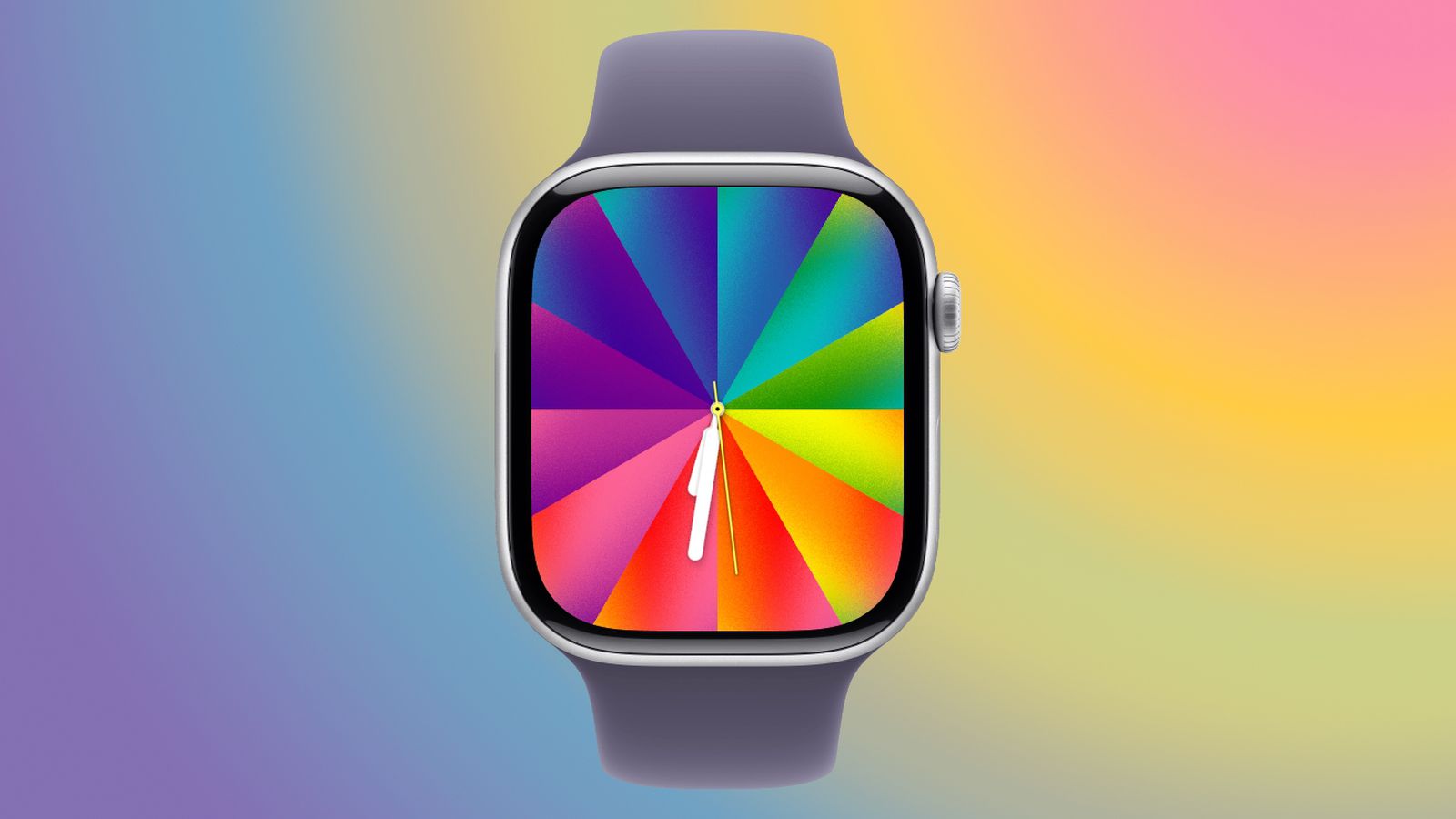
A Closer Look at watchOS 26.5’s New Luminance Watch Face
Apple is currently pushing the release candidates for watchOS 26.5, signaling a production rollout expected within the next week. While the update is ostensibly a point release, the headline feature is the Pride Luminance watch face—a high-customization visual engine that pushes the boundaries of the Apple Watch’s rendering pipeline for personalized aesthetics.
The Tech TL;DR:
- Deep Color Granularity: Supports a custom palette of 1 to 12 colors, including rainbow hues, neutrals, and grayscale, distributed via radial or linear gradients.
- Dynamic State Management: Implements an animated “wrist-down” state that collapses the UI into slim color lines to optimize power consumption.
- Cross-Platform Sync: Integrates a matching customizable wallpaper for iOS 26.5, mirroring the 12-color selection and lock-screen collapse behavior.
From a systems architecture perspective, the Luminance face isn’t merely a skin; This proves a study in balancing GPU overhead with battery longevity. The implementation of slow-shifting colors and animated transitions requires a tight integration between the SoC’s display engine and the Always-On Display (AOD) state machine. For enterprise IT managers overseeing large fleets of corporate wearables, the introduction of such resource-intensive visual assets underscores the importance of maintaining strict version parity across devices. Organizations are increasingly relying on managed service providers (MSPs) to automate the deployment of these OS updates and ensure that firmware stability isn’t compromised by “feature creep” in point releases.
The Rendering Pipeline: Radial vs. Linear Logic
The Luminance engine provides two primary distribution styles: radial, and linear. The radial style functions as a starburst, projecting color vectors from the center toward the hour markers. The linear style utilizes a series of rectangular columns, creating a structured, architectural look. This flexibility is paired with two dial configurations: a “Rectangle” mode for maximum color saturation across the entire screen, and a “Circle” mode that reserves screen real estate for four distinct complications.

This level of customization suggests a shift toward a more modular UI framework within watchOS. Rather than shipping static assets, Apple is deploying a parametric system where the user defines the variables (color count and distribution style), and the system renders the result in real-time. For developers building third-party health or productivity apps, this trend toward high-density customization highlights a growing demand for dynamic UI that can adapt to user-defined color schemes without sacrificing contrast or accessibility.
“The move toward parametric watch faces indicates that Apple is optimizing its Metal framework to handle complex gradients with minimal wake-locks on the CPU, pushing more of the heavy lifting to the GPU’s specialized hardware,” says Marcus Thorne, a lead systems architect specializing in wearable SoC optimization.
Framework C: The Tech Stack & Alternatives Matrix
When comparing the Luminance implementation to other watch face architectures, the distinction lies in the integration between the OS and the hardware. While third-party facelets often suffer from latency or high battery drain due to inefficient polling, the Luminance face is baked into the kernel’s power management profile.
| Feature | Luminance (Proprietary) | Standard Digital (Static) | Third-Party Facelets (API) |
|---|---|---|---|
| Rendering Method | Parametric Gradient/Metal | Static Bitmap/Vector | API-based Overlay |
| Power State | Dynamic AOD Collapse | Fixed Low-Power Mode | Variable (Often High Drain) |
| Customization | 1-12 Color Variable | Preset Palettes | Limited by API Constraints |
| Latency | Near-Zero (Hardware Accel) | Zero | Moderate (App-layer lag) |
For companies looking to build similar high-performance interfaces for proprietary hardware, the gap between “app-layer” UI and “system-layer” UI is where most projects fail. This represents why many firms are now contracting specialized software development agencies to handle low-level C++ or Swift implementations that can interface directly with the hardware’s NPU and GPU.
The Implementation Mandate: Simulating Parametric Gradients
While the Luminance source code is proprietary, developers can achieve similar radial distribution effects in SwiftUI using AngularGradient. To mimic the “1 to 12 color” logic, one would typically map an array of colors to a gradient stop sequence. Below is a conceptual implementation of how a developer might structure a similar dynamic color-wheel component:
import SwiftUI struct LuminanceSimulation: View { let userColors: [Color] = [.red, .orange, .yellow, .green, .blue, .purple] var body: some View { ZStack { // Simulating the Radial 'Starburst' style AngularGradient( gradient: Gradient(colors: userColors), center: .center ) .ignoresSafeArea() // Overlay for the 'Circle' dial complication support Circle() .stroke(Color.black, lineWidth: 2) .padding(20) } } }For more advanced implementations involving real-time color shifting, developers should reference the official Metal documentation or explore community-driven shaders on GitHub to reduce frame-time latency.
The “Wrist-Down” State and Power Rails
The most technically interesting aspect of the Luminance face is its behavior during the transition to the “wrist-down” state. Instead of a simple dimming effect, the UI actively transforms, shrinking the full color palette into slim lines on a black background. This is a strategic move to minimize the number of active pixels on the OLED panel, thereby reducing current draw from the battery.
This transition is likely handled by a high-priority interrupt in the OS, ensuring that the animation is fluid and doesn’t stutter. If a user experiences lag during this transition, it is often a sign of memory pressure or a conflict with background processes. In such cases, enterprise IT departments may need to engage certified IT consultants to audit the device’s app ecosystem and remove resource-heavy legacy software that may be interfering with the system’s priority scheduling.
The accompanying iOS 26.5 wallpaper mirrors this logic, collapsing colors onto a black background when the device is locked. This synchronization across the ecosystem ensures a consistent visual language while adhering to the strict power envelopes required for mobile and wearable hardware.
As Apple continues to merge high-end aesthetic customization with aggressive power management, the line between “lifestyle” features and “system” engineering continues to blur. The Luminance face is a signal that the future of wearable UI is not in static images, but in dynamic, parametric systems that react to both user input and hardware states in real-time.
*Disclaimer: The technical analyses and security protocols detailed in this article are for informational purposes only. Always consult with certified IT and cybersecurity professionals before altering enterprise networks or handling sensitive data.*