
Gmail Users: Act now to Stop Google From Using Your Emails to Train AI
MOUNTAIN VIEW, CA – November 21, 2023 - Google is quietly collecting data from Gmail emails and attachments to train its artificial intelligence models, prompting privacy concerns among users. While the tech giant claims this improves “Smart Features” within Gmail, Chat, and Meet, users can now opt-out of having their data used for AI training – but the process requires navigating multiple settings menus.
The practice, recently highlighted by security firm Malwarebytes, affects anyone using a Google Workspace account or a personal Gmail account with Smart Features enabled. Google’s AI advancements rely on vast datasets, and user email content provides a rich source of information. Disabling these features prevents your data from contributing to Google’s AI progress, but requires proactive steps as the settings aren’t disabled by default and are being rolled out gradually to all users.
Here’s how to disable the AI training features:
step 1: Turn off Smart Features in Gmail,Chat,and Meet
* Open Gmail settings on your desktop or via the mobile app.
* Find the “Smart Features” section (requires scrolling).
* Uncheck the option to enable Smart Features.
* Save changes (desktop only).
Step 2: Turn off Google Workspace Smart Features
* Within Settings, locate “google Workspace smart features.”
* Click “Manage Workspace smart feature settings.”
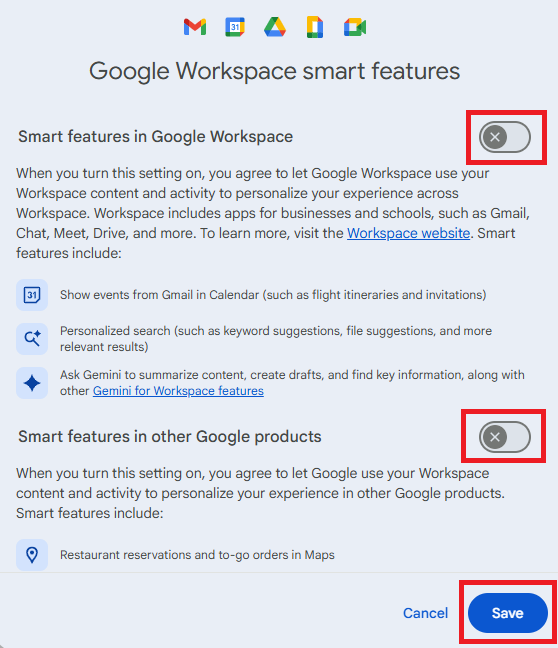
* Toggle off both “Smart features in Google Workspace” and “Smart features in other Google products.”
* Save the changes.
Step 3: Verify Settings
* Confirm both toggles remain off.
* Refresh the gmail app or sign out and back in to ensure changes are applied.
Google separates “Workspace” smart features (email, chat, meet) from smart features used across other Google apps, requiring users to disable both sets of features to fully prevent their data from being used for AI training. the company is rolling out these settings gradually, meaning some accounts may not yet display the options.
